
Customer Service Automation: Where AI Helps and Humans Stay Essential

Updated: Oct 15

Customer expectations have shifted from “please respond soon” to “please respond now, and remember what happened last time.” That pressure lands on support teams already juggling multiple channels, product complexity, and the emotional weight of real customer problems. This is where Customer Service Automation earns its place, not as a replacement story, but as a workload design story.
The most resilient support orgs treat automation as a craft: routing that respects context, self service that actually resolves, and AI assistance that makes agents faster without flattening tone. When done well, customers feel guided instead of deflected, and humans stay focused on what only humans can do: judgment, accountability, and relationship repair.
In this guide, we’ll map the boundary line. We’ll look at where AI systems shine, where people remain essential, and how to build a hybrid operating model that feels human at scale.
Table of Contents
What Customer Service Automation Really Means Today

Customer Service Automation is no longer “add a chatbot.” It is the intentional automation of repeatable service workflows across channels, using tools like conversational AI, knowledge retrieval, intent detection, CRM integrations, and agent assist.
A practical definition is this: automate the predictable steps, preserve human control over the consequential steps.
Here’s what typically sits inside modern service automation:
Intake and triage: Capture the request, identify intent, detect urgency, and route to the right path.
Resolution paths: Serve knowledge articles, guided flows, policy answers, and account actions that are safe to automate.
Assisted human handling: When a human takes over, AI summarizes, drafts, and surfaces context so the agent starts at full speed.
Quality and learning loops: Analytics show what customers ask, what failed, and what knowledge needs updates.
If you are exploring digital human interfaces rather than text only widgets, it helps to see how lifelike conversational experiences can be deployed responsibly in support contexts.
The perspective in AI avatars in customer support is useful for thinking about presence, tone, and consistency without losing the option to escalate to a real person.
Where AI Reliably Helps in Day to Day Support
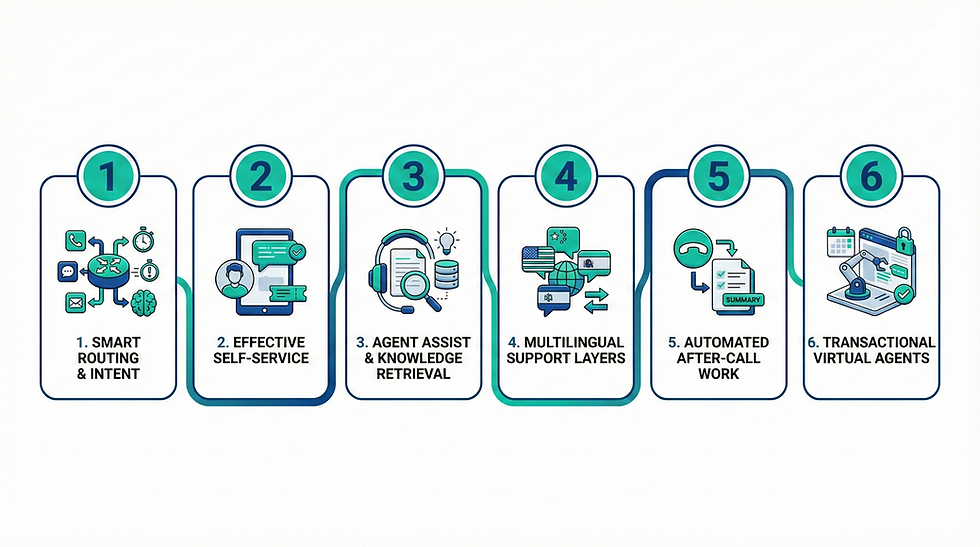
AI is strongest where the problem is high volume, low ambiguity, and policy bound. In those zones, Customer Service Automation reduces wait times and protects agents from repetitive load.
1. Fast routing that respects intent and urgency
Good automation does more than read keywords. It can classify intent, detect sentiment spikes, and identify high risk cues like billing disputes or safety issues. Routing becomes a decision system, not a queue system.
Practical outcomes:
Fewer transfers
Shorter handle time
Higher first contact resolution
Better prioritization during surges
2. Self service that actually resolves
Self service fails when it feels like a maze. AI guided flows can ask two or three clarifying questions, then deliver a resolution path that matches the customer’s scenario.
Typical self service wins:
Order status and delivery changes
Password and access recovery
Subscription upgrades, downgrades, cancellations with clear confirmations
Returns and exchanges with policy guardrails
Appointment scheduling and rescheduling
3. Agent assist that shortens the “search tax”
Even strong agents waste minutes hunting for policy details, past tickets, and product edge cases. AI can surface relevant snippets, propose next steps, and draft responses that match brand voice.
Agent assist usually includes:
Conversation summary and timeline
Suggested macros with editable tone
Knowledge retrieval and citation hints
Form filling assistance in CRM tools
Compliance reminders for regulated scenarios
4. Multilingual coverage without fragmenting the team
Language coverage is expensive when done purely through staffing. AI translation and multilingual conversational layers can provide immediate first response, then hand off to a bilingual agent only when needed.
This is not about pretending translation is perfect. It is about reducing time to comprehension and reducing the number of tickets that require specialist language staffing.
5. After call work automation
A quiet killer in support operations is the work that happens after the customer leaves: notes, tags, follow up tasks, and internal handoffs. Automation can generate clean summaries, extract entities, and recommend ticket categories.
This is one of the safest areas to automate because it is internal and reviewable.
6. Virtual agents that handle bounded actions
When virtual agents are integrated with systems of record, they can complete safe transactions: update an address, resend an invoice, confirm a warranty, schedule a return pickup. The key is permissioning, audit trails, and clear confirmations.
If you want a deeper view of how virtual agents are defined and scoped, what virtual customer service agents are frames the role in a way that supports hybrid teams rather than “automation only” designs.
Where Humans Stay Essential and Why

Every support leader has seen it: a ticket that looked routine turns into a trust moment. Humans remain essential where stakes, nuance, and accountability rise.
1. Emotional repair and relationship leadership
Refund disputes, missed deliveries, service outages, sensitive health or finance contexts, and moments of betrayal require empathy that adapts in real time. AI can help draft language, but the decision making and ownership should stay human.
Humans excel at:
Acknowledging harm without sounding scripted
Reading between the lines of what the customer is not saying
Making judgment calls that balance policy with fairness
Rebuilding trust through clear accountability
2. Exceptions and edge cases
Automation thrives on patterns. Customers thrive on exceptions. When policies collide with reality, a human needs to interpret intent, evaluate risk, and choose the least harmful path.
3. Negotiation and discretionary outcomes
Discounts, goodwill credits, contract adjustments, and retention offers work best when tailored to the customer’s history and value. The tone matters as much as the offer.
4. High consequence decisions and compliance
If the outcome affects safety, legal status, or financial exposure, you want a human in the loop, supported by AI that can surface policy and summarize facts.
5. Complex technical diagnosis
In technical support, the customer narrative is often incomplete. Humans ask better exploratory questions, connect symptoms across systems, and recognize when the issue is actually upstream.
A hybrid model is not a compromise. It is a design principle: automate the predictable, elevate the human, and keep escalation friction low.
Choosing the Right Approach
Approach Best for Strengths Limits Human role
Rule based flows Simple FAQs, fixed policies Stable, predictable, easy to audit Breaks on new scenarios Write and maintain rules, handle exceptions
Conversational AI assistant Guided self service, triage Natural language intake, better containment Needs strong knowledge and guardrails Define boundaries, monitor failures, own escalation
Agent assist Human handled tickets at scale Faster resolution, consistent tone, better summaries Can hallucinate without retrieval controls Review and decide, protect customer outcomes
Agentic workflow automation Multi step tasks across systems Can execute sequences, reduce handoffs Requires strict permissions and logging Approve actions, oversee risk, design playbooks
Digital human front end High touch experiences, brand consistency Presence, clarity, better engagement for some users Must avoid uncanny behavior and overclaiming Set persona boundaries, supervise escalation moments
Applications Across Industries

Customer Service Automation works differently depending on risk, urgency, and customer emotion. The hybrid model is adaptable, but the guardrails change by domain.
Retail and ecommerce: order changes, returns, delivery exceptions, product guidance
Financial services: fraud alerts, card replacement, billing explanations, account verification
Healthcare: appointment workflows, pre visit instructions, post care guidance with safe boundaries
Education: enrollment support, course navigation, scheduling, student services triage
Gaming and entertainment: account access, moderation reports, purchase issues, live event support
Enterprise software: tier one triage, incident intake, renewal coordination, status communications
When you need a platform layer that can unify experiences across teams and channels, it helps to understand how a studio style pipeline can standardize persona, content, and deployment for conversational interfaces. Mimic Studio is relevant here because the operational reality of support is not just “answer questions,” it is governance, versioning, and controlled updates.
For organizations exploring advanced orchestration, especially where workflows require more than one step across tools, AI agents offers a useful frame for thinking about task execution with boundaries, approvals, and accountable escalation.
Benefits

When implemented with clear boundaries and strong knowledge hygiene, Customer Service Automation delivers measurable gains without stripping out the human layer.
Faster first response time across channels
Higher first contact resolution on repeatable issues
Lower agent cognitive load and less burnout from repetitive tickets
More consistent policy enforcement and tone
Better visibility into customer pain points through analytics
More scalable multilingual support coverage
Cleaner documentation and handoffs through automated summaries
Challenges

The failure modes are predictable, which is good news. If you plan for them, you can avoid the “automation that makes customers angrier” trap.
Knowledge drift: outdated articles cause confident wrong answers
Over containment: pushing customers to self service when they need a person
Weak escalation: unclear handoff creates repeated explaining and frustration
Tone mismatch: robotic replies damage trust even if the facts are correct
Permission risk: automated actions without strict controls create exposure
Measurement bias: optimizing for deflection instead of resolution quality
Governance debt: no owner for updates, monitoring, and exception handling
A practical way to benchmark the balance is to compare outcomes, not ideology. If you want a grounded discussion of experience tradeoffs, virtual agents vs human agents for customer experience is a useful lens because it focuses on CX impact rather than novelty.
Future Outlook

Over the next two years, the most important shift will be the move from “single response bots” to systems that can coordinate actions, retrieve verified knowledge, and collaborate with humans in real time.
Expect these trends to define the next generation of Customer Service Automation:
Retrieval grounded assistance becomes standard: AI responses will increasingly be tied to approved knowledge sources, with confidence thresholds and clearer fallbacks.
Real-time coaching inside the agent desktop: Instead of generic scripts, AI will adapt suggestions to customer history, product plan, and current sentiment, while keeping humans in charge of decisions.
More embodied interfaces where appropriate: Digital humans and voice experiences will expand in contexts where presence helps comprehension, especially for guided troubleshooting and onboarding. The ethical line will be clarity: customers should always know when they are interacting with AI, and escalation should remain available.
Agentic workflows with human approvals: Task execution will grow, but approval gates and audit logs will be non negotiable. The goal is speed with accountability.
Operations maturity becomes the differentiator: Teams that treat knowledge as a living asset, and automation as a governed system, will outperform teams that treat AI as a one time installation.
Customer Service Automation Scorecard

Evaluate customer service automation with the same outcome definitions used for human-assisted service. Track accurate resolution, customer effort, successful escalation, response time and satisfaction. Containment alone is not success if people abandon the journey or receive a confident but incorrect answer. Review a representative sample of completed, escalated and abandoned conversations every week.
Use recurring failures to improve knowledge, workflow and staffing. Assign owners to policy gaps and integration errors, document every change and monitor whether the correction reduces repeat failures. This creates a controlled learning loop while keeping human teams accountable for exceptions, emotional repair and sensitive decisions.
Measure verified resolution rather than conversation containment.
Transfer context so customers do not repeat their story.
Protect sensitive data and restrict action permissions.
Review uncertainty, frustration and abandonment signals.
Keep humans responsible for exceptions and recovery.
Related reading: virtual customer service agents guide and conversational AI agent architecture.
Service teams handling emotionally difficult conversations should also review emotional intelligence in AI when defining escalation and tone controls.
FAQs
What is Customer Service Automation in simple terms?
Customer Service Automation is the use of software and AI to handle repeatable support work, like triage, self service resolution, and agent assistance, while keeping humans in control of high stakes cases.
Will automation replace customer support agents?
In strong implementations, no. Automation reduces repetitive workload and speeds resolution, but humans remain essential for empathy, exceptions, negotiation, and accountability.
Which support tasks should be automated first?
Start with after call work, routing, and top repetitive questions that already have clear policy answers. These areas are high volume and low ambiguity.
How do you prevent AI from giving wrong answers?
Use approved knowledge sources, retrieval based responses, confidence thresholds, and clear escalation paths. Monitor failure cases and update knowledge continuously.
What is the best hybrid model for support teams?
Automate predictable steps, escalate quickly when emotion or stakes rise, and equip agents with AI summaries and drafting tools so humans focus on judgment and care.
How do you measure success beyond ticket deflection?
Track resolution quality, repeat contact rate, customer satisfaction, and time to resolution. Deflection can look good on a dashboard while harming trust.
Can automation work for regulated industries like finance or healthcare?
Yes, but with stricter guardrails: permissioning, audit trails, verified knowledge, and human approval for consequential actions.
Are digital humans useful for customer support?
They can be, especially when clarity and guided flows matter. The key is honest disclosure, controlled scope, and easy escalation to a human.
Conclusion
Customer Service Automation is at its best when it behaves like a great stage crew: invisible when things go smoothly, decisive when something goes wrong, and always in service of the people on stage. AI can handle the predictable load, compress response times, and keep knowledge at an agent’s fingertips. Humans remain essential where trust is at risk, where policy meets reality, and where a customer needs to feel heard rather than processed.
The winning play is not replacement. It is orchestration. Build a system where AI does the repeatable work with guardrails, and humans own the moments that define the relationship.
For further information and in case of queries please contact Press department Mimic Minds: info@mimicminds.com.


Comments