
AI TALKING AVATAR CREATOR
AI Talking Avatar Creator for Videos and Websites
Create lifelike talking avatars that speak, present, explain, guide and engage your audience across videos, websites, apps, training content, product demos and digital experiences.
Mimic Minds helps brands, creators, agencies and enterprise teams turn scripts, voices and digital characters into premium AI talking avatars. Build a realistic avatar presenter, create talking avatar videos, add a digital human to your website, or design an interactive AI spokesperson that represents your brand with a natural human presence.


OVERVIEW
What Is an AI Talking Avatar Creator?
A talking avatar creator is a platform that lets you create a digital character, AI avatar or lifelike digital human that can speak from a script, voice input or AI-powered conversation. It can be used to create talking avatar videos, AI presenter videos, product explainers, training content, customer support guides, website avatars and brand spokesperson experiences.
With Mimic Minds, a talking avatar is more than a simple animated face. It can become a realistic AI avatar with natural voice, facial expression, personality, brand knowledge and real-time interaction.
Turn approved scripts into presenter-led content without arranging a new shoot.
Faster Content Production

Reuse one avatar, voice and tone across campaigns, channels and teams.
Consistent Brand Delivery

Localize content for new audiences while keeping the same digital identity.
Multilingual and Reusable

USE CASES
What Can You Create with a Talking Avatar?

1. Talking Avatar Videos
Create talking avatar videos from scripts for websites, ads, social media, presentations, product explainers and internal communication. Instead of recording a new video every time, you can use an AI talking avatar generator to create polished presenter-led content quickly.

2. AI Spokesperson Avatar
Create an AI spokesperson avatar that represents your brand with a consistent face, voice and tone. Use it across landing pages, campaigns, product announcements, demos, and customer education.

3. Website Talking Avatar
Add a talking avatar to your website to welcome visitors, explain services, answer questions and guide users toward the right CTA. A talking avatar for websites can make your site feel more interactive than a standard chatbot or static page.

4. AI Training Avatar
Create talking avatars for employee training, onboarding, tutorials, compliance content, education and knowledge sharing. A consistent AI avatar presenter can deliver training content in a clear, repeatable and scalable way.

5. Product Explainer Avatar
Use a talking avatar to explain how your product works, what problem it solves, and why users should care. This is useful for SaaS, ecommerce, technology, healthcare, finance, education and enterprise products.

6. Interactive AI Talking Avatar
Go beyond video. Build a talking avatar that can respond in real time using conversational AI, approved knowledge and brand-specific behavior. This creates a more natural interface for support, sales, onboarding and engagement.
CREATOR FEATURES
Control How Your Talking Avatar Looks, Speaks and Responds

Script to Talking Avatar
Paste your script and turn it into a talking avatar video with a clear presenter-style delivery.

AI Voice and Speech Control
Choose voice, tone, pacing, language and delivery style to match your brand.

Custom Avatar Creation
Use ready-made avatars or create custom digital humans for your brand, team, campaign or industry.

Video and Real-Time Use Cases
Create both pre-recorded talking avatar videos and interactive AI avatar experiences.

Brand-Safe Messaging
Control the avatar’s knowledge, tone, scripts, responses and approved communication boundaries.

Scalable Content Creation
Reuse the same avatar across multiple videos, campaigns, landing pages, training modules and customer journeys.
HOW IT WORKS
Create a Talking Avatar in Four Steps

Step 1
Choose Your Avatar, Voice and Language
Select or create an avatar, then choose the voice, language and delivery style for your audience.

Step 2
Add Your Script
Paste the message you want your avatar to speak, such as a product intro, training lesson, sales pitch or support answer.

Step 3
Generate Your Talking Avatar
Create a polished talking avatar video or interactive avatar experience.
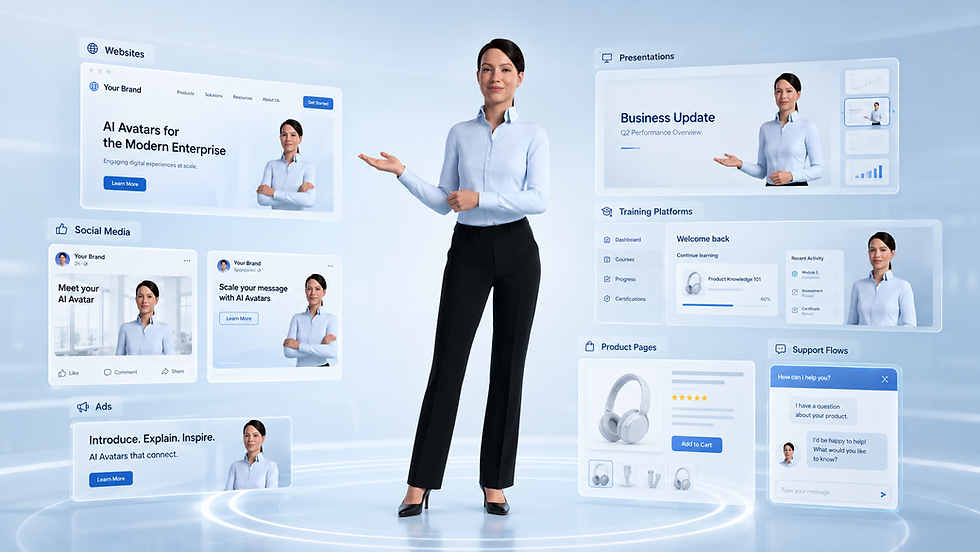
Step 4
Publish and Scale
Use your talking avatar on websites, social media, ads, training platforms, presentations, product pages and support flows.
Embed your avatar on websites and apps to guide visitors and explain offers.
Web and App Deployment

Use the same character in generated videos or real-time conversational experiences.
Pre-Recorded and Real-Time

Support campaigns, onboarding, product education and customer service with one avatar.
Marketing, Training and Support

Frequently asked questions
- 01
- 02
- 03
- 04
- 05