


Overview
What Is an AI Virtual Host for Live Streaming?
An AI virtual host is a digital character that presents a live broadcast or virtual event. It can deliver prepared segments and respond to viewer questions through supported chat or voice integrations.
Core Benefits
Make Every Live Stream More Interactive

Real-Time Audience Engagement
Let viewers submit questions and receive relevant responses during the live experience.

Consistent On-Screen Host
Use the same branded presenter across broadcasts, campaigns, events and platforms.

Live Programme Guidance
Introduce segments, speakers, products, matches, premieres and upcoming activities.

Multilingual Delivery
Support international audiences through selected languages and localized programme information.

Reusable Digital Talent
Use the same virtual host for recurring shows, seasonal events and ongoing community streams.

Human Oversight
Give producers control over scripts, responses, show timing and escalation during the broadcast.
How It Works
Launch Your AI Virtual Host in Four Steps

01. Design
Define the host’s appearance, role, personality, voice and audience.

02. Prepare
Add the show rundown, approved information, scripts, FAQs and interaction rules.

03. Connect
Connect the host to your selected broadcast setup, then test speech, timing, audience input and producer controls before launch.

04. Go Live
Launch the host, manage audience interactions and update the experience throughout the event.
Use Cases
One Virtual Host. Multiple Live Experiences.

Entertainment Premieres
Welcome viewers, introduce programme highlights and guide audiences through virtual premieres.

Live Shopping
Present products, explain features and direct audiences toward product pages or shopping actions.

Gaming and Esports Streams
Introduce matches, discuss game content and support community interaction during live broadcasts.

Sports and Match Coverage
Present pre-show information, schedules, team introductions and approved event updates.

Product Launches
Reveal new products, introduce speakers and answer common audience questions.

Virtual Conferences
Welcome participants, explain the agenda and introduce sessions, speakers and event resources.
Live Hosting Capabilities
Support Every Moment of the Broadcast

Opening and Welcome
Introduce the livestream, explain the format and set expectations for the audience.

Segment Introductions
Present speakers, performers, products, matches or programme sections.

Audience Questions
Respond to approved questions using event information and configured knowledge.

Polls and Participation
Invite viewers to vote, choose topics or participate through supported platform features.

Sponsor Messages
Present approved sponsorship messages and branded programme transitions.

Closing and Next Steps
Summarize the experience and direct viewers toward upcoming events, content or calls to action.
Producer Controls
Keep Your Production Team in Control
01
Show Rundown
Prepare the programme order, segment timing and presenter scripts before going live.
02
Approved Knowledge
Ground answers in selected event, product, platform and programme information.
03
Response Boundaries
Define permitted topics, restricted subjects and appropriate fallback messages.
04
Live Overrides
Allow a producer to update instructions or replace a response during the broadcast.
05
Human Takeover
Transfer control to a human presenter or support team when necessary.
06
Event Monitoring
Track technical status, audience interactions and relevant engagement events.
Streaming Platforms
Bring Your Virtual Host to Every Live Channel

OTT and Media Platforms
Add a digital host to premieres, watch parties and platform-exclusive broadcasts.

Live Event Platforms
Use the avatar for conferences, webinars, exhibitions and hybrid events.

Streaming Websites
Embed a virtual presenter into branded livestream and campaign pages.
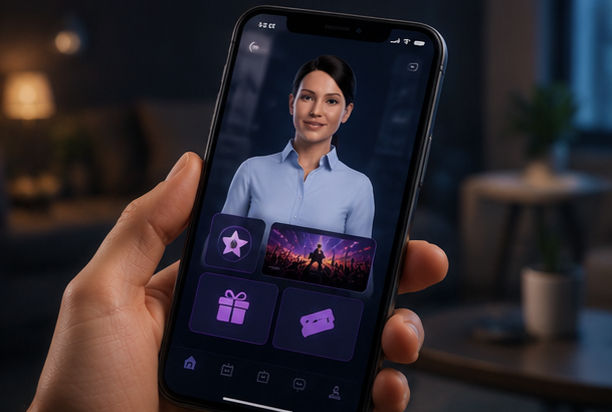
Mobile Applications
Deliver host-led live experiences within supported mobile app journeys.

Social Livestreams
Include your virtual host in social broadcasts, with audience interaction configured for supported platform tools.
XR and Virtual Worlds
Bring an embodied host into immersive broadcasts, digital venues and virtual events.
Why Mimic Minds
Digital Human Craft Meets Real-Time Broadcasting
Mimic Minds combines conversational AI with extensive experience in digital humans, facial animation, character development and real-time experiences.
We create virtual hosts designed around the programme, audience and brand rather than applying a generic presenter template.

Custom Digital Characters
Develop a photorealistic presenter, stylized host, virtual mascot or original entertainment personality.

Expressive Live Performance
Combine natural speech, facial animation and gestures with real-time conversational behaviour.

Brand-Level Customization
Define clothing, voice, tone, language, visual style and presenter personality.

Context-Aware Interaction
Connect approved event information and programme context to the host’s responses.

Prerecorded and Live Formats
Use the same digital host for livestreams, promotional videos and on-demand content.

Cross-Platform Deployment
Adapt the character for streaming, web, mobile, events, kiosks and immersive environments.
Frequently asked questions
- 01
- 02
- 03
- 04
- 05