

AI Tutor Avatar for Education: Guided Practice for Every Learner
Give learners a patient guide for questions, revision and practice. Build an AI tutor avatar around your approved curriculum, with explanations matched to the learning task. Choose the subjects, languages and teacher handoff process before launch.
Intelligent AI Tutor That Inspires Lifelong Learning
An AI tutor avatar is a digital character that turns learning material into a guided conversation. Learners can ask for another explanation, work through examples and rehearse a skill at their own pace. Start with a defined subject and reviewed teaching resources. Educators should test the answers, set age-appropriate boundaries and provide a clear route to human help when a question falls outside the approved material.

Meet Professor Lumen: The Friendly AI Tutor Avatar
Patience, Positivity, and Personalized Guidance
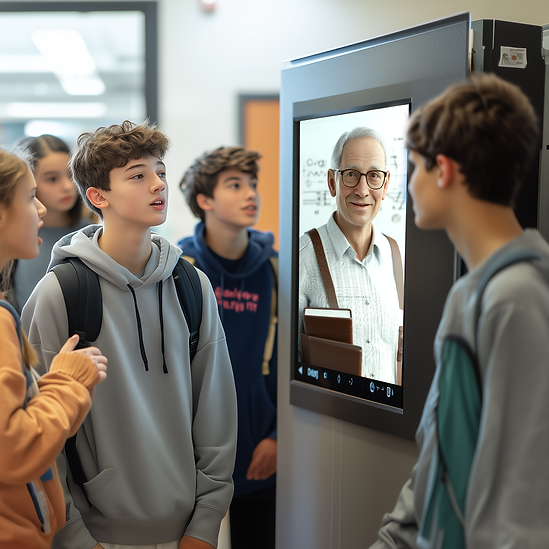
Professor Lumen brings a friendly face to guided learning. Shape this AI tutor around a specific subject, learner age and set of approved resources. A session might explain a concept, offer a worked example and invite the learner to try a similar question.
Teachers remain responsible for the learning goals and the accuracy of the material. The avatar should acknowledge uncertainty and direct learners to an educator when needed.
Plan the languages, reading level and accessibility requirements for your audience, then test representative lessons before rollout.

Why Choose AI Tutor for Education?
Solutions & Advantages

Adaptive
Learning AI
Let learners request simpler explanations, repeat examples and practise a topic at a pace that suits the lesson.

Trusted
Expertise
Base explanations on reviewed course material. Teachers define the scope, check answers and update resources as lessons change.
Scalable & Accessible
Support classrooms and online courses with consistent guidance. Test language, device and accessibility needs before extending access.

Consistent Engagement
Encourage learners to ask questions, try an answer and reflect on feedback, using a supportive tone appropriate to their age and task.
Use Cases of AI Tutor Avatar
AI Tutor Avatar Applications in Education
Personalized Tutoring
Offer step-by-step explanations of a defined topic, followed by a worked example and a practice question. Let learners revisit difficult steps while teachers review the lesson content.
Homework Helper
Help students unpack an assignment with hints, questions and worked examples. Set rules for assessed work so guidance supports their own reasoning instead of supplying a finished submission.
Exam Preparation
Build revision sessions around the syllabus, sample questions and approved explanations. Ask learners to explain their reasoning, revisit mistakes and identify topics to discuss with a teacher.
Skill Development
Use structured conversations to practise language, presentations and interview answers. Define a clear learning goal and review criteria, then combine avatar practice with feedback from an educator.
Let’s Make Learning Future-Ready
Start with one learning objective and a small set of reviewed lessons. Bring your curriculum, sample questions, learner needs and privacy requirements to the discussion. Test Professor Lumen with educators and representative learners, then review answer accuracy, task completion and feedback before expanding the experience. For practical examples, explore our guide to AI avatars for education.
FAQ
FAQs about AI Tutor Avatar in Education
Learners can ask for a simpler explanation, another example or additional practice within an approved topic. Educators define the learning goals and resources, then test how the avatar responds to different learner needs.
They are intended to support educators with additional explanations and practice. Teachers remain responsible for learning goals, content accuracy, assessment and situations that require human judgment or support.
Choose a defined subject and provide reviewed curriculum resources, sample questions and explanations. Confirm the intended scope with Mimic Minds and test representative lessons before making the experience available to learners.
Plan the languages, reading levels, input methods and accessibility features your learners need. Availability depends on the chosen interface and deployment, so verify the required features with representative users before launch.
Define what information the experience collects, who can access it and how long it is retained. Review age-appropriate safeguards and institutional privacy requirements before launch. Compliance depends on the configured deployment and its use; do not assume it is automatic.