
Mimic AI Studio Personas: Creating Consistent AI Characters
Updated: Sep 28

Not every project needs a custom-built AI avatar. Mimic AI Studio ships with a curated library of prebuilt Personas, ready-made characters with a name, a voice, a 3D model, and a personality already tuned to a specific industry or use case. The question isn't whether to build from scratch; it's which of the existing cast already fits, and what to reach for when none of them quite do.
This guide walks through the Personas library inside Mimic AI Studio, maps every persona to the industry it's designed for, and covers how to go from browsing to a live conversation. If you are new to the platform, our step-by-step guide on how to use Mimic Studio explains the workflow from avatar creation to deployment.
Table of Contents
What Are Prebuilt AI Personas?

A Persona in Mimic AI Studio is a ready-made AI avatar, 2D or 3D, that already has a name, a voice, a visual identity, and a written backstory shaping how it talks and what it talks about. Where building a custom avatar means designing all of that yourself, a persona is the finished product: pick one that matches your industry, and it's already in character.
Each persona in the library is tagged with an industry or role, general, business, education, gaming, wellness, mobility, sport, retail, fashion, or friend/companion and filterable by whether it's a 2D or 3D model, so narrowing down the right fit takes seconds, not a design brief.
The distinction that matters most in practice is between a persona and a script. A persona isn't a fixed set of pre-written responses attached to a face, it's a personality layer sitting in front of a conversational model, which is why Coach Steele can talk about a specific workout he's never been asked about before, and Professor Lumen can explain a topic that wasn't in any FAQ. The industry tag sets the frame; the conversation inside that frame is generated, not looked up.
Step-by-Step: Browsing and Starting a Conversation
Step 1 - Sign In to Mimic AI Studio
Sign in with email/password or one-click Google sign-in.
Step 2 - Open the Personas Library
Click Personas in the sidebar. Every prebuilt avatar is listed as a card with its name, industry tag, model type (2D/3D), and a one-line introduction in its own voice searchable by name, and filterable by type.

Step 3 - Preview a Persona
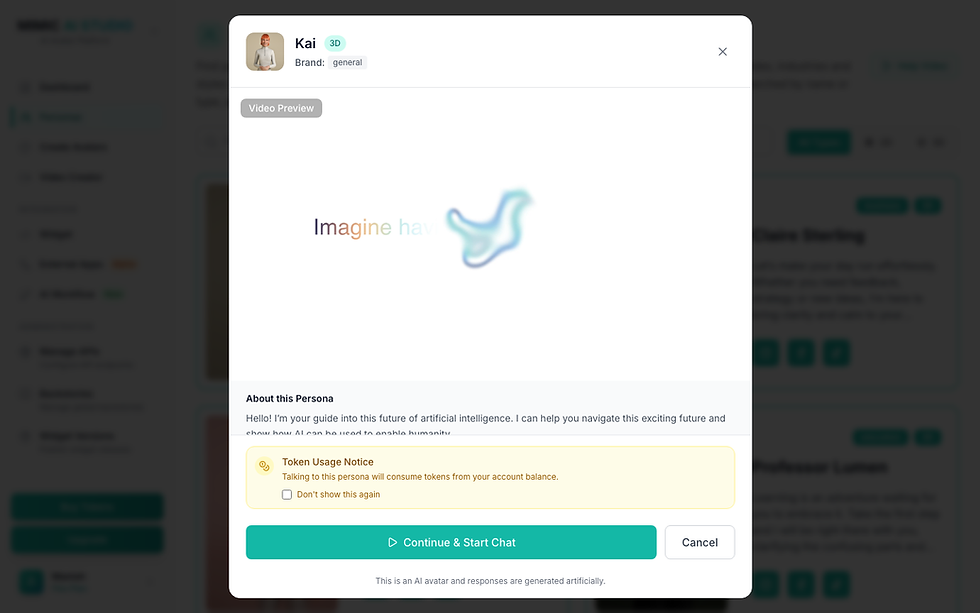
Click any card to open its preview: a short video preview of the character, its full introduction, and a Start Chat button. This is the moment to confirm tone and industry fit before committing, Coach Steele's high-energy fitness framing reads very differently from Sage Zenari's wellness-focused calm, even though both are 3D personas.

Step 4 - Start the Conversation
Clicking Start Chat shows a token usage notice (talking to any persona draws from your account's token balance), then connects a live, responsive avatar within roughly 20-30 seconds - camera angle control, chat history, and both voice and text input included.

The Full Cast: Which Persona Fits Which Industry
The complete library at time of writing, mapped by industry:
Persona | Industry / Role | In their own words |
Kai | General / AI Influencer | Your guide to the world of AI, curious and approachable. Start here to explore what AI can do. |
Claire Sterling | Business | Your polished AI executive assistant and strategy sounding-board, feedback, strategy, and an organized day. |
Kiki Kai | Cartoon | A playful animated companion for kids and creatives, colorful, curious, and full of imagination. |
Professor Lumen | Education | Your patient AI tutor for any subject. clarifying, encouraging, and never in a rush. |
Max Crit | Gaming | Your high-energy gaming buddy and hype-man, game recs, release news, and meta breakdowns. |
Sage Zenari | Wellness | Your calm companion for mindfulness and balance, stress relief and healthier habits. |
Axel Miles | Mobility | Your forward-looking guide to smart cities and transport, mobility trends and smoother journeys. |
Coach Steele | Sports | Your AI fitness coach and training partner, motivation, workout guidance, goals you'll hit. |
Evan Porter | Retail | Your personal shopping assistant, comparing options, spotting real value, finding your style. |
Lys Laurent | Fashion | Your bold, expressive style commentator, the newest trends, real or virtual. |
Elf Kai | General / Seasonal | A holiday variant of Kai for seasonal campaigns, festive tone, same underlying persona. |
Lena Palmer | Friend / Companion | A warm, always-there companion who actually listens, everyday chat and steady support. |
Mark Truman | Friend / Companion | A laid-back companion who grows with you, casual conversation and easy check-ins. |
A pattern worth noticing: the library isn't just one persona per industry, Kai and Elf Kai share a base identity with a seasonal variant, and Lena Palmer and Mark Truman both cover the same “friend/companion” role with different tones. Industry tags narrow the field; the actual personality description in each preview is what decides fit.
How It Works: Deploy in Three Steps
Mimic AI Studio frames the path from browsing to production the same way regardless of whether you start from a persona or a blank slate:
Step 01 - Choose Your Persona
Pick an existing persona that matches your brand and audience, or start a custom avatar from scratch.
Step 02 - Customize & Brief
Define personality, voice, knowledge, and communication style, persona defaults can be adjusted, or set from zero for a custom build.
Step 03 - Deploy Anywhere
Put the avatar to work on websites, mobile apps, kiosks, social platforms, or through direct integration.
Businesses looking to connect AI avatars with existing platforms can explore our AI avatar API integration guide to understand deployment options and technical requirements.
Prebuilt Persona vs. Custom Avatar, Which Do You Need?
Situation | Prebuilt Persona | Custom Avatar | Why |
Testing the platform quickly | Yes | No | Live in under a minute, no setup |
Generic industry use case (fitness, education, retail...) | Yes | Optional | A close match likely already exists |
Specific brand name, face, and voice | No | Yes | Personas are shared, not brand-exclusive |
Unique personality/backstory not covered by the library | No | Yes | Full control over traits, role, and context |
Seasonal or campaign-specific variant | Depends | Yes | Elf Kai shows this is possible within the library, but a bespoke campaign usually needs a custom build |
Benefits of Starting From a Prebuilt Persona
Zero setup time - live in a conversation in under a minute, versus roughly 15-20 minutes to design a custom character.
Pre-tuned personality - tone, voice, and subject focus are already dialed in for the industry tag, not guessed at.
Good for evaluation - test the platform's conversation quality and interaction model before investing in a custom build.
Covers common cases well - with 13 personas spanning general, business, education, gaming, wellness, mobility, sport, retail, fashion, and companion roles, most generic use cases already have a close match.
Lower risk before committing - previewing a persona's tone and video sample costs nothing; tokens are only spent once a conversation actually starts. Before choosing between prebuilt personas and custom development, businesses can also evaluate factors such as pricing, production complexity, and ongoing costs in our guide on how much an AI avatar costs
A useful reference point even when you don't use one directly - seeing how Mimic AI Studio balances personality, industry focus, and tone across 13 different characters is a fast way to calibrate what a good backstory looks like before writing your own for a custom avatar.
FAQs
What are AI personas?
Ready-made AI avatars with a fixed name, voice, visual identity, and backstory, built for a specific industry or role so they're usable in conversation immediately, without any setup.
How are AI personas different from chatbots?
A chatbot is typically a text interface with a script or a general model behind it. A persona is a visual, voiced 3D or 2D character with a defined personality that holds a live conversation - closer to a digital presenter than a support widget.
Can AI personas be customized for my brand?
The personas in the shared library are not brand-exclusive. For a name, face, and personality unique to your brand, the equivalent path is building a custom avatar. If you want to understand the complete process behind designing, customizing, and launching your own digital character, explore our guide on how to create an AI avatar.
What industries can use AI personas?
The current library spans general/influencer, business, education, gaming, wellness, mobility, sport, retail, fashion, and friend/companion roles - see the full table above for which persona maps to which.
Can AI personas provide information 24/7?
Yes, a persona is a software service, not a scheduled human presenter, so conversations are available whenever the platform is up, with no working-hours constraint.
Do I need to pay to talk to a persona?
Conversations draw from your account's token balance, and the platform shows a token usage notice before a chat starts, so cost is visible upfront rather than billed after the fact.
What's the difference between a 2D and 3D persona?
2D personas are flatter, illustration-style characters, generally lighter to render; 3D personas have depth and more realistic movement, better suited to video and live-chat contexts where physical presence matters.
Can a persona also appear in generated videos, not just live chat?
Yes, the same persona system that powers live Personas chat is available as an avatar source inside Video Creator, so a persona's face and voice can also narrate a scripted video. For teams creating video content at scale, AI avatar video generation tools can transform written scripts into engaging digital presenter videos. Learn more in our guide to text-to-video AI avatar generators
Conclusion
Thirteen personas, ten-plus industries, and a live conversation in under a minute, the prebuilt library exists precisely so that most projects don't need to start a character from zero. Match the industry tag, preview the tone, and start talking; reach for a custom avatar only once you've confirmed none of the cast already fits.
Browse the full library yourself at Mimic AI Studio, see the public-facing cast on the AI Agents page, or explore custom, brand-specific builds via Enterprise. Questions first? Check the FAQs.


Comments