
Visual AI Agents: How Perception, Reasoning and Action Work

Updated: 6 days ago

What happens when an AI stops being a text box and starts acting like a present, perceptive teammate on screen?
That question is why visual AI agents are showing up everywhere serious digital experience design is happening right now. Chatbots made information searchable. AI avatars made conversation feel human. But a conversational interface that can also see, respond, perform and coordinate actions across tools is a different category altogether. It is closer to a staffed front desk than a help widget.
In practice, visual AI agents combine real-time conversation with a visual presence and agentic behavior. They can interpret intent, guide users through tasks, generate or operate media, and escalate to humans when needed, all while staying anchored to brand tone, compliance rules, and measurable outcomes. This is the bridge between conversational UX and operational automation, delivered through an embodied interface that people actually enjoy interacting with.
Table of Contents
What Are Visual AI Agents
A visual AI agent is a conversational system with an on-screen presence that can both talk and act. Unlike a standard bot that answers questions, it can run workflows, retrieve data, produce or control video responses, and guide users step by step through decisions while maintaining consistent character, tone, and safety constraints.
Think of it as three layers working together.
Perception and context: Understands the user’s language, intent, and session state.
Performance layer: Speaks with a voice, shows expressions, and maintains a believable on-screen presence.
Action layer: Uses tools, APIs, and guarded automations to complete tasks, not just describe them.
That is the key shift. A chatbot explains. A visual agent executes while staying conversational.
When teams want a front end interface that feels like a person but behaves like software, they typically start by exploring an agent capable experience through a dedicated hub. That is the point of a page like the Mimic Minds agents ecosystem, where the emphasis is not just on talking, but on handling tasks across channels in a controlled way using an embodied interface.
From Chatbots to Avatars to Agentic Video Experiences

The market moved in phases.
ChatbotsThey were built for scale and deflection. They are useful, but they often fail at nuance, multi turn workflows, and emotional pacing. They also create a familiar frustration: users have to translate their real-world goal into a sequence of prompts.
AI avatarsAvatars made conversation feel less transactional. A digital human can soften friction, explain options with empathy, and provide a branded experience. If you have seen the shift in customer support and onboarding, you have already felt this change. Many teams start by reading the differences between automated support roles, virtual agents, and staffed operations, then deciding where an avatar interface adds value. For example, a piece like virtual customer service agents frames the difference between a scripted support layer and a real conversational interface that can actually carry the interaction.
Visual AI agentsThis is the next step. The visual interface remains, but now the system can plan and act. It can open a product flow, schedule, fetch policies, validate inputs, generate a video response for asynchronous delivery, or route to a human while summarizing context.
This is where terms like AI video agent and agentic video start to matter. Not because video is a gimmick, but because video becomes a delivery format for action outcomes. A user asks, the system completes the workflow, then responds as a short, context aware clip, a live video conversation, or a hybrid of both.
If you want a concrete starting point for how agentic behavior differs from simple generation, the framing in agentic AI vs generative AI helps: the difference is the presence of planning, tool use, and iterative completion rather than one shot content output.
How a Visual AI Agent Works in a Production Grade Pipeline

Under the hood, the best systems borrow from film and real-time character pipelines, then merge that with modern AI orchestration.
1. Character foundation and identity lock
A believable agent starts with a defined character bible. This includes:
Visual style rules
Voice and pacing
Approved vocabulary and taboo phrases
Escalation behavior
Ethical boundaries and consent requirements
This is where brand voice stops being a marketing note and becomes an operational constraint. The agent should never drift into unsafe or off brand improvisation.
2. Conversational core with memory boundaries
The conversational brain needs:
Intent recognition
Short term state for the session
Optional long term memory with opt in and data minimization
Retrieval from approved knowledge bases
The goal is simple: a user should not have to repeat themselves, but the system must not store more than it should.
3. Visual performance layer
This is the craft part. In a real pipeline, you are matching:
Lip sync to phonemes
Eye line and micro expressions
Idle motion and breathing
Camera framing and lighting continuity
If you are building an AI avatar agent for live conversation, performance quality becomes product quality. Users forgive a wrong answer more than they forgive an eerie performance. That is why so many teams spend time understanding uncanny valley dynamics before they scale. A clear explanation like uncanny valley explained is useful because it reframes the challenge as a design problem, not a novelty problem.
4. Action and tool orchestration
This is what separates visual AI agents from purely conversational avatars. The agent should be able to:
Call APIs in a gated way
Fill forms and validate constraints
Query inventory or schedules
Create tickets and summaries
Trigger media generation flows
Hand off to humans with context
If you want the interface to feel present, the system must narrate what it is doing in plain language, then confirm outcomes. People trust what they can follow.
5. Delivery modes: live, asynchronous, or blended
Agentic video workflows are often blended:
Live video for high intent conversations
Short generated clips for follow ups or confirmations
Text plus video for accessibility and speed
An AI video agent can feel like a personal concierge when it is used to wrap up actions in a clear, human tone. This is especially effective in training, onboarding, and commerce where users benefit from seeing the next step, not reading a wall of text.
True real-time visual agents excel at processing information and responding instantaneously, creating seamless user journeys. This immediate feedback loop allows for dynamic adjustments to conversation flow and task execution, mirroring human-like responsiveness. Such speed is crucial for complex interactions where delays can disrupt user engagement and task completion.
What Makes a Conversational Visual Agent Feel Real
The realism people describe is rarely about photorealism alone. It is about behavior.
Turn taking that respects pauses and uncertainty
Clarifying questions asked at the right moment
Emotional mirroring without exaggeration
Consistent memory within the session
Honest limitations, with graceful escalation
Stable persona across channels
A real-time avatar that can converse naturally is one of the clearest stepping stones to a true agentic interface. If you want a practical breakdown of what creates that human feel, real-time conversational avatar details the elements people notice first: timing, eye contact, voice cadence, and the sense that the system is listening rather than waiting for keywords.
Comparison Table
Approach What it is Best for Limitations What makes it upgrade ready
Chatbot Text based Q and A interface FAQs, simple routing, low risk deflection brittle context, weak emotional UX, limited actions add retrieval, add workflow tools, add escalation logic
AI avatar On-screen conversational character onboarding, support, brand experiences, guided education often still passive, may not complete tasks connect to tools, define action plans, instrument analytics
Visual AI agent Embodied interface that can plan and act end to end workflows, commerce, service, training, operations requires governance, tooling, content rules strong orchestration, safe tool use, consistent persona
AI video agent Video first responses driven by intent follow ups, training, async customer care may feel one directional if not interactive combine with live mode, add stateful memory and tools
Agentic video system Video delivery plus planning and completion complex guided experiences, high conversion flows needs careful pacing and error handling narrative of actions, multi step confirmations, human handoff
Applications Across Industries

Visual agents become most valuable when you need both trust and throughput. They can meet users where attention is short, while still completing tasks that normally require a human.
Retail and ecommerce: Guided shopping, returns, sizing support, personalized bundles, multilingual assistance.
Education and training: Tutor style explanations, scenario based learning, assessments, feedback loops.
Healthcare and wellness: Intake guidance, medication reminders, lifestyle coaching with clear escalation rules.
Mobility and automotive: In-vehicle companions, service scheduling, feature explanations, safety prompts.
Enterprise operations: HR onboarding, IT triage, internal knowledge navigation, compliance friendly support.
Media and events: Hosts, anchors, interactive presenters, exhibit engagement.
For commerce, an on-screen agent becomes a stronger interface when the brand wants more than search and filters. A dedicated experience like an AI avatar for shopping illustrates how a guided, character driven flow can reduce decision fatigue and increase confidence at the moment of purchase.
For learning, a tutor style digital human can shift training from static modules to adaptive coaching. Teams exploring this often start with an AI tutor avatar for education because it frames the role clearly: guidance, practice, feedback, and consistency across sessions.
For mobility, a visual agent can function as a calm companion that explains systems and reduces cognitive load. That is why an AI avatar for mobility style experience is compelling in dashboards, kiosks, and wayfinding environments where users need clarity fast.
If you want to place these use cases in a bigger portfolio view, the industries overview page helps map where different embodied interfaces make sense, from customer facing deployment to internal operations.
Benefits
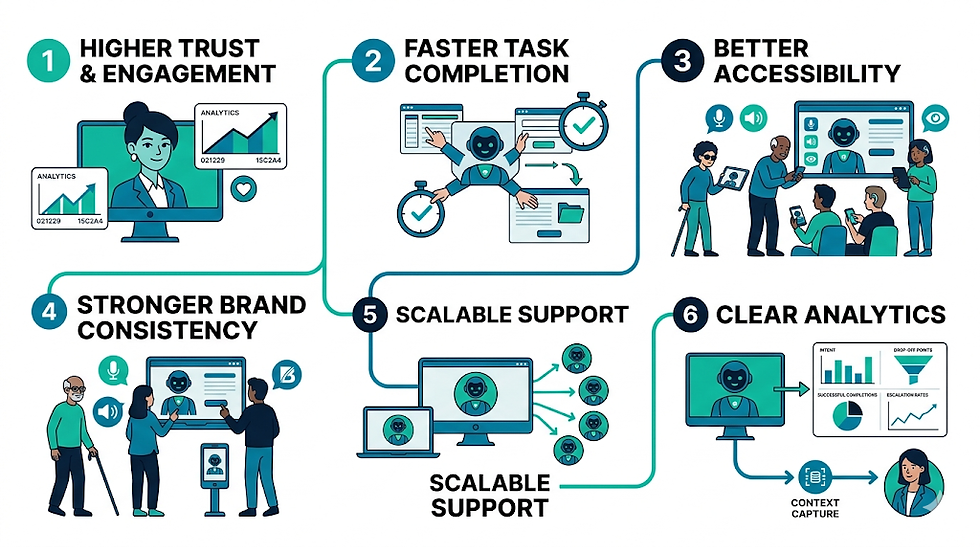
The advantage of visual AI agents is not that they are flashy. It is that they align how humans prefer to interact with how software prefers to operate.
Higher trust and engagement compared to text only interfaces
Faster task completion because the system can guide and execute
Better accessibility for users who prefer voice and visual cues
Stronger brand consistency through a controlled character layer
Scalable support without losing a human tone
Clear analytics: intent, drop off points, successful completions, escalation rates
More reliable handoffs to humans via summaries and context capture
In customer support, the best outcomes often come from pairing empathetic presence with automation. That is where a visual agent can reduce repetitive load while keeping sensitive conversations routed safely. Reading through AI avatars in customer support can clarify how this balance works in real deployments.
Future Outlook
The next two years will be defined by convergence: real-time graphics pipelines meeting tool using AI.
On the graphics side, we will see more real-time rigs, faster facial animation systems, and higher quality performance capture data driving believable expressions in live experiences. On the AI side, we will see agents that can plan over longer horizons, understand multimodal inputs, and operate across more tools with guardrails.
The most important shift will be governance. As these systems become more capable, teams will focus less on making them talk and more on making them safe, consistent, and measurable. The winners will be the companies that treat a visual agent like a product with QA, not a demo with a script.
That is also why platforms matter. A studio environment like Mimic AI Studio signals a broader move: content teams want control over characters, outputs, workflows, and deployment, without rebuilding the stack for every campaign.
In parallel, the definition of agentic video will expand. It will not just mean video generated by AI. It will mean video responses that represent completed actions, verified outcomes, and next steps, delivered in a format humans remember.
Building a Reliable Visual AI Agent

A visual AI agent is a system that uses images or video as part of its understanding and decision process. Unlike a model that only labels an image, an agent can observe a scene, combine visual evidence with other information, reason about a goal and select an approved action.
The perception layer may detect objects, read text, estimate position, track motion or compare visual states. Results are never perfect, so the system should preserve confidence and uncertainty instead of converting every detection into a definite fact. Lighting, camera angle, occlusion and unfamiliar environments can change performance.
Planning, Controls and Implementation
Reasoning connects perception to context. An agent may use instructions, memory, maps, product data or workflow rules to decide what the observation means. Good designs separate what was directly observed from what was inferred, making it easier to test errors and explain decisions.
Actions should be limited by permission and risk. A visual agent might flag a defect, guide a user, move a digital cursor or suggest a route. High-impact actions in physical, financial or safety systems require confirmation, redundant checks and human oversight.
Define the observations and actions required for one task.
Preserve confidence and separate observation from inference.
Restrict permissions according to impact and reversibility.
Minimize capture, retention and exposure of visual data.
Test real environments, edge cases and safe fallback behavior.
Measurement and Responsible Deployment
Privacy must be designed into the camera workflow. Limit what is captured, process data locally when practical, mask unnecessary identities and define retention. People should know when visual sensing is active and how to request review or correction where appropriate.
Evaluation should include representative scenes and failure cases. Test different devices, environments, user groups and adversarial conditions. Measure perception accuracy, task completion, unsafe actions, latency and recovery when the visual evidence is incomplete.
Related Mimic Minds Guides
Frequently Asked Questions
What is a visual AI agent?
It is an AI system that uses images or video to understand context, reason about a goal and select controlled actions.
How is it different from computer vision?
Computer vision produces observations, while an agent can use those observations with context and tools to pursue a task.
What can visual AI agents do?
They can inspect products, navigate interfaces, guide users, monitor environments and assist physical or digital workflows.
Can a visual AI agent make mistakes?
Yes. Lighting, occlusion, unfamiliar scenes and model limitations can produce incorrect observations or actions.
How should actions be controlled?
Use limited permissions, confirmation, redundant checks, monitoring and human oversight based on risk.
What are the privacy concerns?
Cameras may capture identities, locations or sensitive information, so collection and retention should be minimized and transparent.
How are visual AI agents tested?
Test representative environments, devices, edge cases and adversarial inputs while measuring accuracy, latency and unsafe outcomes.
Can a visual AI agent work with an avatar?
Yes. A visual agent can interpret the environment while an avatar explains observations or guides the user.
Conclusion
Visual AI agents are the natural evolution from chatbots and standalone avatars because they unite presence with capability. People want to talk to something that feels attentive, and businesses need systems that can actually complete work, not just describe it.
When you approach this space with a production mindset, the path becomes clear: define the character, lock the voice, build the action layer with guarded tool access, and treat performance quality as seriously as answer quality. That is how you move from novelty to trust.
In the Mimicverse, the goal is not to make AI look human for its own sake. The goal is to create living interfaces that communicate with empathy, operate with precision, and scale without losing the craft. Visual agents are where that vision becomes operational.
For further information and in case of queries please contact Press department Mimic Minds: info@mimicminds.com


Comments